

This guide explains how to generate and use JWTs for authentication, so that you can securely interact with Ampersand APIs from your frontend and your customers will only have access to their own Ampersand installations. When you first start using Ampersand’s prebuilt UI components or headless UI, using a frontend API key is convenient since it does not require you to implement any server logic. However, as you move into production, we recommend that you stop using frontend API keys and start using JWT authentication for better security.Documentation Index
Fetch the complete documentation index at: https://ampersand-24eb5c1a-docs-subscribe-permission-metadata.mintlify.app/llms.txt
Use this file to discover all available pages before exploring further.
Overview
The overall flow uses RSA-based JWT tokens with RS256 signing. It consists of:- RSA Key Pair Generation - Create a public/private key pair.
- Key Registration - Register the public key with Ampersand.
- JWT Token Generation - Create signed JWT tokens in your server.
- API Authentication - Use JWTs to authenticate API requests made by your frontend code, by providing a
getTokenmethod to the Ampersand UI library.
1. Generate RSA key pair
First, generate an RSA key pair for signing JWTs. You can use any crypto library that can generate an RSA key pair. Only RS256 algorithm is supported. The example below uses the Node.js librarycrypto.
You only need to do this step when you first implement JWT auth, and every time you want to rotate keys.
2. Register public key with Ampersand
Using the Ampersand Dashboard
You can add your RSA public key and view your existing Key IDs (kid) directly in the Ampersand Dashboard.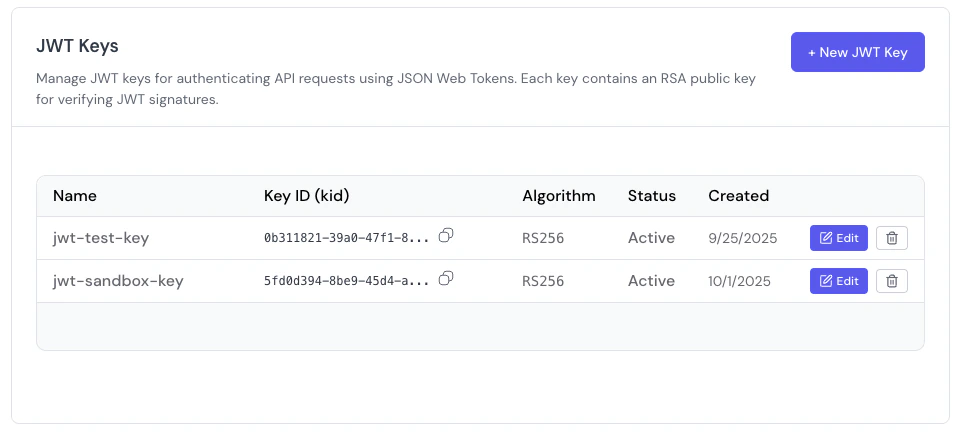
Using the API
You can also register the public key programmatically using the Create a new JWT key endpoint.3. Generate JWT tokens in server
Create JWT tokens for a particulargroupRef and consumerRef combo using public and private keys generated in step 1. You can use any library of choice that can sign JWT keys. The example below uses the Node.js library jsonwebtoken.
You need to then expose an API endpoint that your frontend code can call to fetch a JWT token.
4. Fetch JWT token in frontend
This functionality is only available in
@amp-labs/react version 2.8.7 and above.apiKey property, provide a getToken method that calls your backend to fetch a JWT token. The UI library will call it whenever it needs to generate a new token, or when the existing token expires.
The getToken method must have the following type signature:
(params: {consumerRef: string, groupRef: string}) => Promise<string>
Key management API endpoints
The backend provides these endpoints for managing JWT keys:- Register a new public key
- List all keys for a project
- Get a specific key
- Update a key’s label or status
- Delete a key
Important security notes
- Private Key Security: Never expose private keys in client-side code. Store them securely on your backend servers.
-
Token Expiration: Tokens can have a maximum TTL of 10 minutes (600 seconds). The Ampersand UI library will automatically call the
getTokenfunction you provide when the token expires. - Key Rotation: Regularly rotate your RSA key pairs for better security.